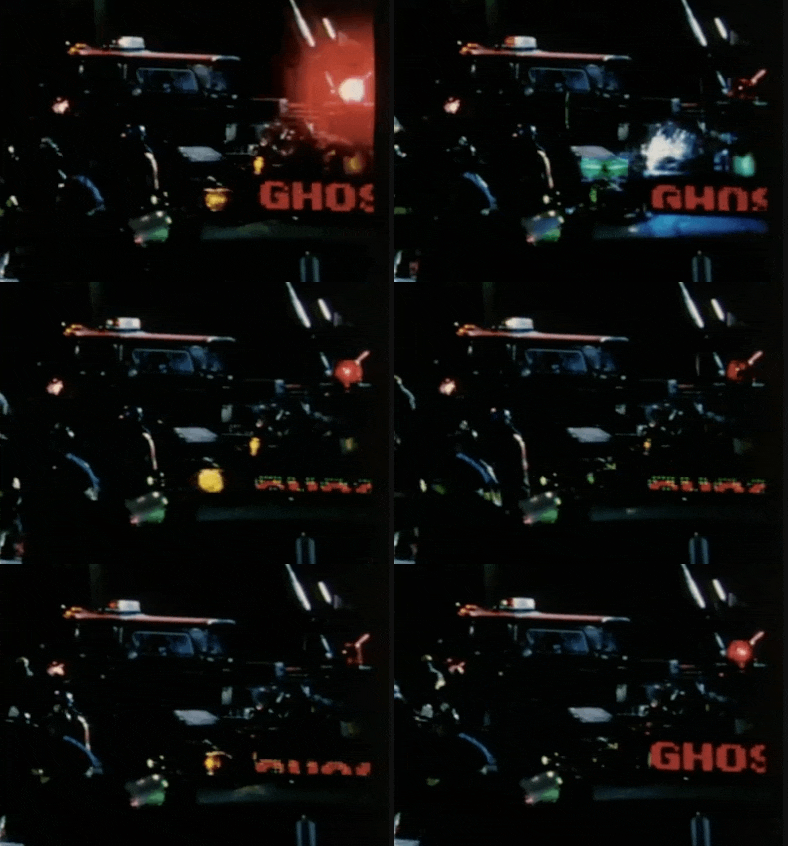
Building on the incredible research in @prodestrian’s Screen Accurate ECTO-1A Dot Matrix LED Sign (Reference) thread, I’ve turned the community’s findings into a working animation of the sign loop. Everything is open and free to use:
- A ready-to-load file for CoolLED1248 LED panels (the cheap Bluetooth panels sold on AliExpress and Amazon), 16×96 size.
- Open frame data (GIF, PNG frames, sprite sheet, JSON, and an Arduino/C header) so you can drive any LED sign, app, or scratch-built replica.
- A full attribution audit with evidence cards: every screen, colour and effect is traced to a post or a reference image, shown side by side with the recreation.
My rule: everything is attributed. Where the look of an effect isn’t documented, it’s clearly labelled as inferred, with the evidence behind the guess.

Download + docs: GitHub - rmbrumback-lab/ecto-1a-led-sign: A frame-by-frame recreation of the roof-mounted dot-matrix sign from the Ecto-1A in Ghostbusters II (1989), packaged for CoolLED1248 LED panels and exported in open formats for any other LED sign, app or microcontroller project. · GitHub
CoolLED files (pick one):
- Single file (compressed timing, 22.6 s): https://github.com/rmbrumback-lab/ecto-1a-led-sign/raw/main/dist/Ecto-1A_GB2_16x96.jt
- Two files, screen-timed (44.2 s). Load both and play Part 1 then Part 2:
- https://github.com/rmbrumback-lab/ecto-1a-led-sign/raw/main/dist/two_part/Ecto-1A_GB2_16x96_Part1.jt
- https://github.com/rmbrumback-lab/ecto-1a-led-sign/raw/main/dist/two_part/Ecto-1A_GB2_16x96_Part2.jt
Attribution audit: ecto-1a-led-sign/docs/ATTRIBUTION.md at main · rmbrumback-lab/ecto-1a-led-sign · GitHub
Credit where it’s due
None of this exists without the people in the reference thread:
- @prodestrian worked out the 80×7 red/green matrix, the green-sits-lower quirk, the complete text list, the A–L sequence, and a scene-by-scene breakdown of the film, deleted scenes and premiere footage. That breakdown is the backbone of the animation.
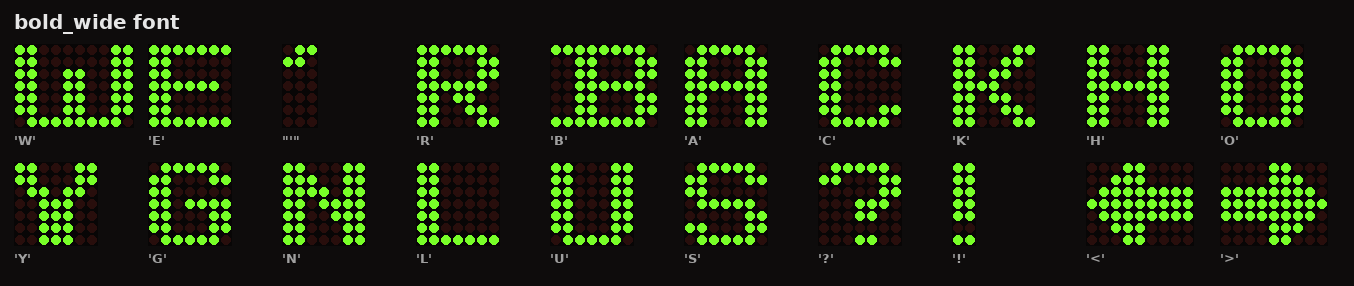
- @zerosum contributed the pixel maps, premiere screen grabs, and the WE’RE BACK book scan. I read most of the bold font from that scan.
- @Kingpin found the 1989 premiere footage (YouTube + Getty), the best reference we have for the sequence. He also nailed that the “yellow” is just red and green lit together.
- @d_osborn pointed to the EPK and posted the close-ups.
Thanks also to auc0le (JT-Edit) and UpDryTwist (coolledx-driver). Their open-source work is the only public documentation of the CoolLED file format.
What the sign does (as recreated)
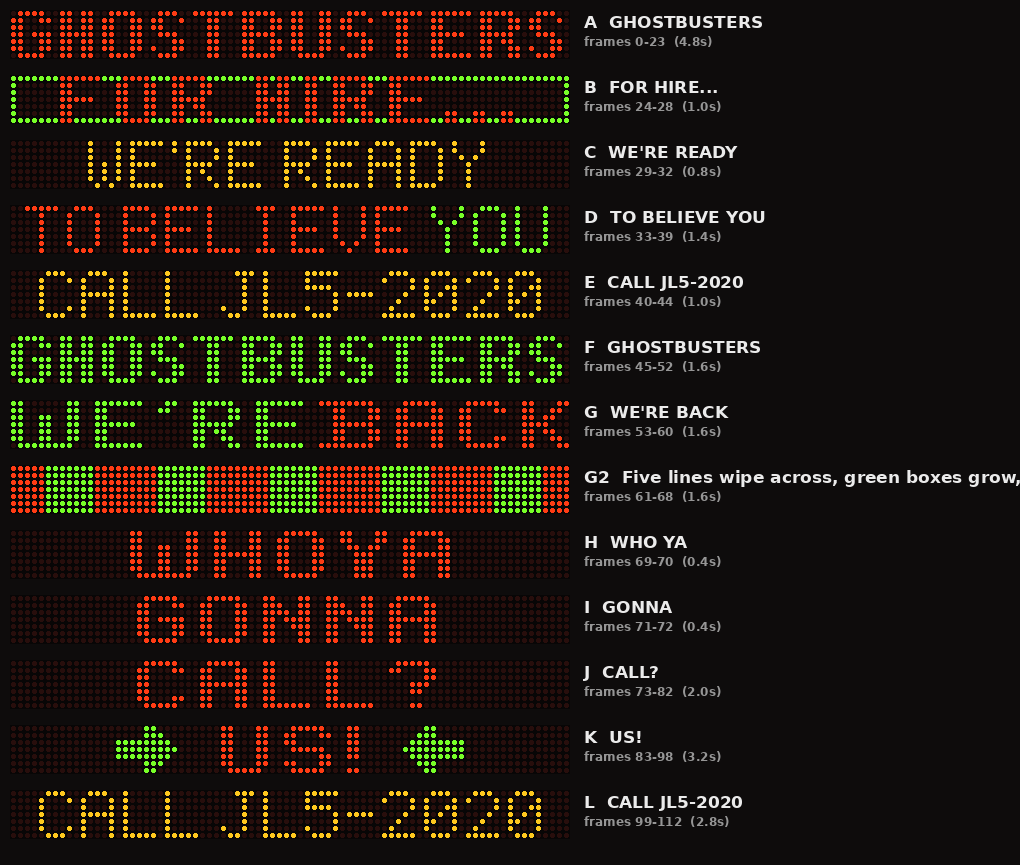
The IDs match prodestrian’s A–L frames. It’s one loop: 22 seconds in the single file, or 44 seconds in the two-part screen-timed version.
- GHOSTBUSTERS slides up in red, shimmers in green, rapidly swaps red/green about 16 times, then goes solid green.
- FOR HIRE… wipes in from the green, in red inside a green border, then a green wipe.
- WE’RE READY, wiped in from the green.
- TO BELIEVE YOU: the highlight moves word by word: TO (green), BELIEVE (amber), then YOU. YOU’s colour is my guess. It then wipes down as CALL JL5-2020 (amber) slides in from the top.
- A red wipe, then GHOSTBUSTERS in green with the shimmer, wiping from green to red, then solid red.
- A green flash → WE’RE BACK, with the words swapping colours.
- The five lines → green boxes graphic. This is my inferred reconstruction; see below.
- WHO YA and GONNA, then red CALL?, which slides up and out. The sign then goes dark briefly.
- US! appears on its own, then the green arrows come on, off and on again.
- CALL JL5-2020 opens out from the centre while the arrows are still lit, holds, slides down, and GHOSTBUSTERS rises to start again.
What I inferred, and why
Three things are confirmed to happen on the real sign, but nobody has documented exactly what they look like. I’ve reconstructed them as best guesses, labelled as such everywhere:
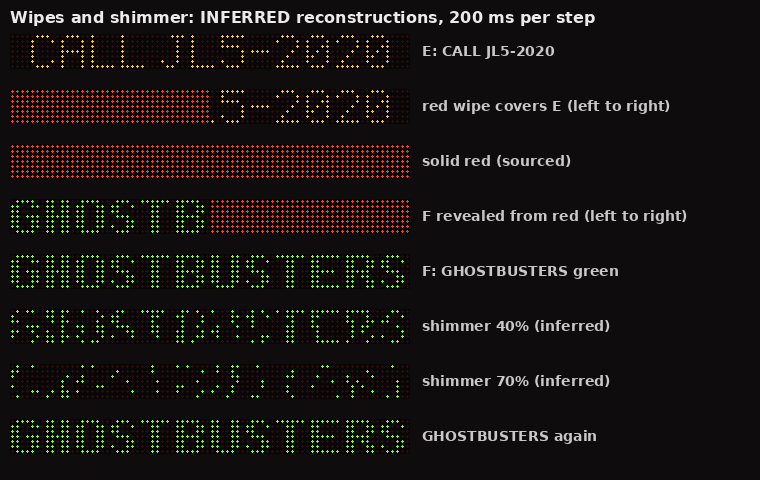
1. The colour wipes. The thread confirms each wipe and its colour: green into FOR HIRE…, green before WE’RE READY, red into the second GHOSTBUSTERS, and green-to-red within it. Nobody records the direction. In the deleted-scene clip, red sweeps in from the left on this sign during the lines → boxes graphic, so I’ve drawn every wipe left to right.
2. The shimmer. It’s confirmed on green GHOSTBUSTERS: for a few seconds before the red/green swaps (Getty footage), and after the red wipe (film; the behind-the-scenes footage shows GHOSTBUSTERS, shimmer, GHOSTBUSTERS again). I couldn’t measure the thread’s shimmer GIFs, so it’s rendered as random per-pixel sparkle.
3. The five lines → green boxes.
- Confirmed:
- five vertical lines that wipe across and are replaced by green boxes, looping (prodestrian’s breakdown of the Getty premiere footage);
- in the deleted-scene clip, the order red fill → green growing out from inside each section → red sweeping back from the left → green again, with dark dividers during red and red dividers during green.
- Inferred: the clip only shows the right third of the sign, out of focus. I assumed five 16-column sections; the clip’s spacing measures 14–15 columns, which fits. The full-height fill and number of steps are also my assumptions.
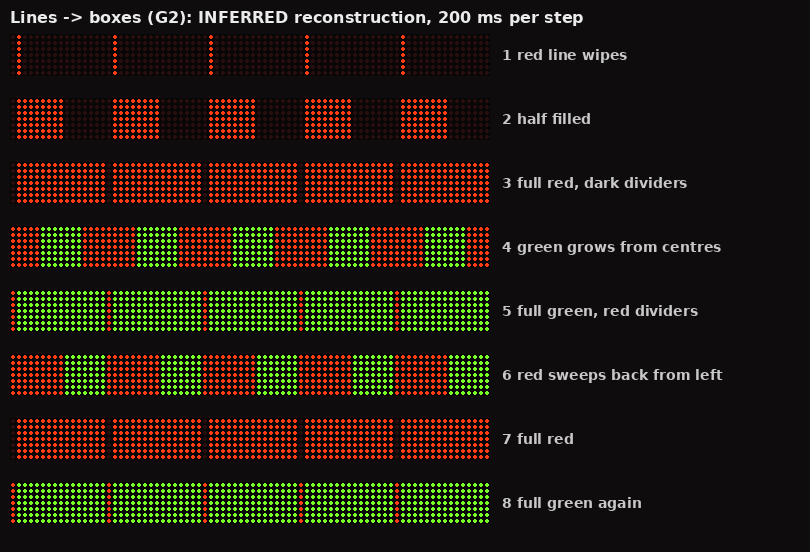
I dropped one thing outright: the possible upside-down flip in GHOSTBUSTERS, since the thread only says “possibly”.
Every element has an evidence card in the repo, showing the source extract (credited to its poster here and the rights holder) beside my rendering, marked sourced / measured / estimate / inferred: ecto-1a-led-sign/docs/evidence at main · rmbrumback-lab/ecto-1a-led-sign · GitHub
If anyone has clear footage of the shimmer, the wipes, or a sharp full-width shot of the lines → boxes, post it and I’ll replace the guesses with the real thing.
How I worked it out
1. The file format. CoolLED’s .jt files turn out to be JSON containing the frames as colour bit-planes. I worked out the layout from JT-Edit and the coolledx driver. I then proved it by re-encoding four files exported by the CoolLED app and getting byte-identical results. One catch: the panel’s upload protocol caps a 16×96 animation at 113 frames. That’s why the timing is tighter than in the film.
2. The sequence. I took this straight from prodestrian’s analysis: what transitions into what, the slides, the solid colour frames, and the colour swaps.
3. The photos. I enlarged the stills posted in the thread and laid an 80×7 grid over each one, with perspective correction on the angled shots. That turned up:
- The sign uses three fonts, not one:
- Bold wide for WE’RE BACK. B, A, C and K came pixel-for-pixel from zerosum’s scan, and the phrase adds up to exactly 80 columns.
- Bold narrow for GHOSTBUSTERS, which runs edge to edge.
- Thin 5×7 for CALL JL5-2020 and TO BELIEVE YOU.
- FOR HIRE… has a green border.
- CALL JL5-2020 is amber. You can see both colours lit in the Getty close-up.
- TO BELIEVE YOU shows one word highlighted at a time (TO green, BELIEVE amber), so I’ve animated it word by word through YOU.
- The green shapes beside US! are arrows pointing in at the word.
4. The deleted-scene clip. I went through the Hardemeyer deleted-scene GIF frame by frame, all 181 frames, calibrating colours against things we already know (red US!, green arrows, amber CALL). It showed:
- WHO YA and CALL? are red.
- After CALL?, the sign goes dark for about 0.8 s.
- US! appears alone first; the arrows then come on for about 1.2 s, go off for 0.8 s, and come back.
- CALL JL5-2020 opens out from the centre while the arrows are still lit. You can see “JL5” between the arrows, then “L JL5-20”, then the full text. It holds about 2 s, then slides down as red GHOSTBUSTERS rises.
5. The green offset. The panel version uses two panel rows per sign row. That let me draw the green half a pixel lower than the red, just like the real sign, where “BACK” doesn’t line up with “WE’RE”:

Still unknown (shown, but flagged)
These frames are confirmed to exist, but some details aren’t:
- the font and colour of WE’RE READY, the colour of GONNA, and the exact letter shapes of WHO YA / GONNA / CALL?;
- YOU’s highlight colour, and the speed of the word-by-word highlight;
- the US! arrowhead shape (the premiere frames are heavily blurred);
- the exact look of the wipes, shimmer and lines → boxes graphic (all inferred);
- the exact timing of everything before CALL? (J–L are timed from the deleted-scene clip; the two-part version uses 2-second holds based on the measured CALL JL5-2020 hold).
Each one is marked in the attribution audit. A clear shot of GONNA, or a sharp full-width shot of the lines → boxes graphic, would settle most of what’s left. If you have them, please post them.
Using it
- CoolLED1248 (16×96): download the
.jtto your phone (Android), tap it, and open with CoolLED1248. A single file holds at most 113 frames, so the single-file version compresses the timing. If your panel can play two programmes in a row, use Part 1 + Part 2 for screen-accurate timing. The app versions that support.jtimport are 2.x. iOS import isn’t confirmed yet. - Any other sign or app: the repo’s
dist/folder has:frames_80x7/— 113 PNGs, 200 ms each- a sprite sheet
ecto1a_frames.json— every frame as 0/1/2/3 values (off/red/green/both, the same scheme prodestrian proposed)ecto1a_playlist.json— deduplicatedecto1a_frames.h— for Arduino/ESP32
- The
docs/PORTING.mdguide covers making a pixel-exact GIF, scaling to other panel sizes, and driving true red/green LEDs for a full-size replica. - Other CoolLED sizes: the generator script is included. Change two numbers and re-run it.
Code and data are MIT-licensed. The small credited source extracts on the evidence cards belong to their owners and aren’t covered by that licence.
If you load it on a panel, I’d love to see a photo.