Question: Cyclotron lights to fast! Proton Wand Light Kit and Amplified Light and Sound Controller

Hi fellow Ghostbusters, I’m 98% finished with my proton pack.
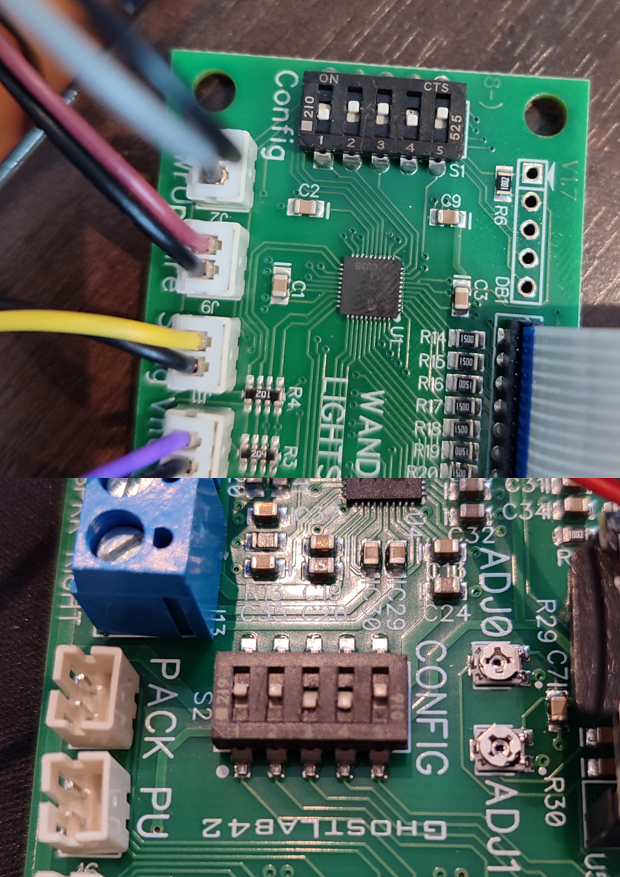
I’ve installed and tested all the electronics. You can see my DIP
switch settings in the photos. I’m happy with it so far, but how
do I make the four cyclotron LEDs light up more slowly?

The lights illuminate in a clockwise sequence, but unfortunately,
it’s too fast; I’d like them to light up more slowly. Is there any way
to adjust this via the hardware?

Thanks for your help, and best regards from Germany,
Thomas

I don’t know anything about this specific light kit, so I can only guess. The only other adjustment parts I see are the spots labeled ADJ0 and ADJ1. You should be able to use a screwdriver and turn each of those to the left and the right.
Ok spooky i give them later a try and give here a short feedback…
Thanks Man!

The adjustment potentiometers only adjust the powercell.

This is the dip switch table:

Pack Description Pack Sel0 Pack Sel1 Heating Wand Lights Description 1 2 3
4x Red Snap OFF OFF OFF Movie Wand OFF OFF X
4x Red Fade ON OFF OFF Movie Wand OFF OFF X
Afterlife Red ON ON OFF Movie Wand OFF OFF X
4x Red Snap OFF OFF ON Movie Wand w/Heating OFF ON ON
4x Red Fade ON OFF ON Movie Wand w/Heating OFF ON ON
Afterlife Red ON ON ON Movie Wand w/Heating OFF ON ON
4x TVG OFF ON ON TVG Wands ON ON X

It appears you have it set to Afterlife mode.

If you have the 4 individual cyclotron LEDs and wand it to fade I believe 1 should be on and 2 should be off.

You of course can change all the timings by modifying the firmware and uploading it to your board over USB:

1 Like

Thanks for your help aj-quick.
Let’s see if I can make some headway with my question and get it to work.